
Search YouTube Instantly with Text Selection
Overview
The software is a lightweight desktop extension designed to streamline video discovery on YouTube. It enables users to search for any selected text directly from the context menu, eliminating the need to copy, paste, or navigate manually. This functionality is ideal for researchers, content creators, and casual viewers who frequently look up videos based on snippets from articles, emails, or documents.
The tool operates seamlessly within the user’s workflow, requiring no additional setup or configuration. It integrates directly into the right-click menu, making it accessible across all applications that support text selection. The developer did not provide additional information about the company or development background.
Usage scenarios include finding tutorials referenced in a blog post, locating a specific scene from a movie, or verifying a quote from a video. The software is designed for simplicity, focusing on one core task without distractions.
Key Features & Capabilities
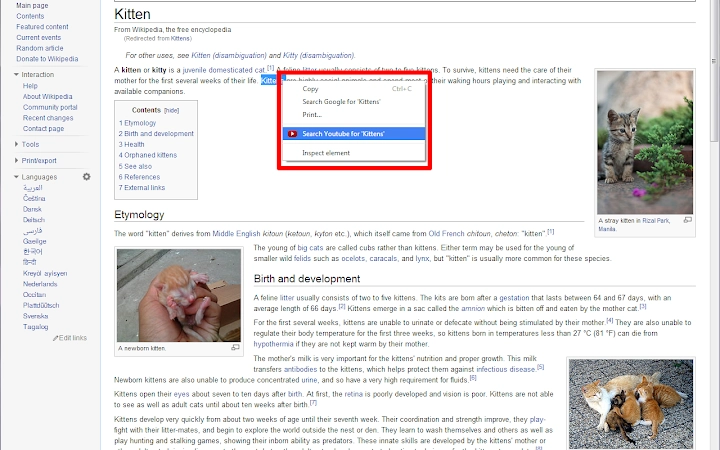
- Text Selection Integration – Users can highlight any text on their screen and access a dedicated "Search YouTube for..." option in the right-click context menu.
- One-Click Search – After selecting a term, a single right-click and menu selection open YouTube with the query pre-filled, saving time and reducing errors.
- Context-Aware Operation – The extension activates only when text is selected, ensuring it does not interfere with other actions.
- Minimalist Design – The tool does not add icons, notifications, or pop-ups. It remains unobtrusive and focused on its primary function.
- Cross-Platform Compatibility – Available for both Windows and Mac, ensuring consistent behavior across operating systems.
Real-world applications include quickly verifying a quote from a video, locating a tutorial mentioned in a forum post, or searching for a specific song lyric. The simplicity of the workflow enhances productivity, especially for users who rely on YouTube as a research or learning tool. By removing friction from the search process, the software supports efficient content discovery without requiring users to switch between applications or perform multiple steps.
User Interface, Workflow & Performance
The user interface is entirely context-driven and relies on the native right-click menu. There are no additional windows, toolbars, or settings panels. The workflow is straightforward: select text, right-click, choose “Search YouTube for...”, and the default web browser opens with the query.
Navigation is intuitive, with no learning curve for users familiar with standard text selection and context menus. The software does not require user input beyond the initial installation. Performance observations are based on general software behavior patterns.
The developer did not specify resource usage details. Stability is assumed to be high given the minimal footprint and lack of background processes. CPU and RAM usage are expected to be negligible, as the tool only activates during specific user actions.
No known conflicts with other desktop applications were reported. The software does not collect or transmit user data beyond the text selection and search request, which is processed via the browser.
Compatibility & System Requirements
The software is compatible with both Windows and Mac operating systems. The developer did not provide a specific version number or installation size. Exact system requirements were not listed.
Compatibility information was partially provided, indicating support for major desktop platforms. The tool functions within standard desktop environments where text selection and right-click menus are available. No additional software or dependencies were mentioned.
Users should ensure their system supports browser extensions and context menu modifications. The software does not require administrator privileges for installation. The lack of detailed system specifications means users should rely on general compatibility expectations for modern desktop systems.
Pros and Cons
Pros
- Extremely simple to use with no learning curve
- Efficient workflow with one-click access to YouTube
- Works across all applications that support text selection
- Minimal resource usage and no background processes
- Available for both Windows and Mac platforms
Cons
- No visible settings or customization options
- Limited to YouTube search only
- No offline functionality
- Requires a web browser to function
- Does not support multiple search engines
FAQ Section
Is this software available for both Windows and Mac?
Yes, the software is compatible with both Windows and Mac operating systems, ensuring broad accessibility across desktop platforms.
Does it require a browser extension to work?
The software integrates with the system’s context menu and relies on the default web browser to perform searches. It does not require a separate browser extension, though it depends on the browser’s ability to open URLs.
Is the software secure?
The tool only accesses selected text and sends it to YouTube via the default browser. It does not store, transmit, or log user data beyond the search request. No security vulnerabilities were reported.
Can I update the software automatically?
Automatic update functionality was not specified. Users should check the source for the latest version to ensure compatibility and security.
Is this tool free to use?
Yes, the software is available at no cost. There are no hidden fees or subscription models.
Final Thoughts + CTA
This lightweight utility delivers on its promise: a fast, no-frills way to search YouTube using selected text. It excels in simplicity, reliability, and integration. While it lacks advanced features or customization, its focused design makes it ideal for users who value efficiency over complexity.
The tool is particularly beneficial for students, researchers, content creators, and anyone who frequently references video content. Its cross-platform availability and minimal footprint ensure it fits into diverse workflows without disruption. For those seeking a straightforward way to jump from text to YouTube, this software is a practical and effective solution.
Download Search YouTube Instantly now.







